
Egocentric Video Capturing Task
Earn ₹1,000 for Every 1-Hour Approved Video
About the Initiative
Innodata is collecting first-person (egocentric) video recordings of people performing every day, real-world tasks in natural environments, including homes and business settings.
These videos capture activities from the participant’s point of view, helping AI systems understand how people interact with objects, tools, spaces, and their surroundings while completing different tasks.
The collected data will support the development and evaluation of robotics, Physical AI, Embodied AI, workflow understanding, and activity recognition systems. By learning from real human actions, these technologies can become better at understanding tasks and how they are performed in the real world.
The initiative focuses on collecting natural, high-quality video data that reflects real human behavior, creating valuable datasets for training, and advancing the next generation of AI-powered and robotic systems.
Task Categories
Repairs & DIY
Capture practical, hands-on tasks around the home, such as repairing, assembling, or maintaining everyday items using tools and equipment.
Assembling furniture, Installing shelves or organizers,Hanging pictures or wall décor, Tightening screws or fasteners, Replacing light bulbs, Replacing batteries in devices, Repairing loose cabinet handles, Organizing or maintaining tools, Basic woodworking projects, Small home repair tasks, Mounting hooks or brackets, Adjusting or repairing household fixtures.
Gardening & Farming
Record natural activities involved in caring for plants and gardens, from planting and pruning to watering, harvesting, and using gardening tools.
Watering plants, Planting flowers or vegetables, Pulling weeds, Pruning plants, Sweeping patios or walkways, Cleaning outdoor furniture, Organizing garden tools, Light yard cleanup, Washing a vehicle, Moving items between house, garage, or shed, Cleaning a garage workspace, Seasonal outdoor maintenance.
Technology & Computing
Show how you interact with everyday technology, including setting up devices, installing equipment, managing cables, and troubleshooting hardware.
Setting up a desktop computer,Connecting monitors and peripherals,Organizing cables and chargers, Setting up a printer, Cleaning computer equipment, Installing hardware accessories, Configuring networking equipment, Setting up smart home devices, Arranging a workstation, Upgrading computer components, Troubleshooting hardware connections, Organizing electronic devices and accessories.
Textile & Creative Crafts
Capture creative, hands-on work such as sewing, knitting, crocheting, leathercraft, bookbinding, jewelry making, and pottery or ceramics, Drawing or sketching, Painting, Coloring projects, Sewing clothing or fabric items, Mending clothing, Knitting, Crocheting, Building model kits, Scrapbooking, Jewelry making, DIY craft projects, Creating handmade decorations, Organizing craft materials.
Personal Care
Capture hands-on personal-care activities such as hair care, nail care, and grooming tasks that can be performed without showing the face.
Organizing grooming supplies, Arranging personal care products, Cleaning grooming tools, Organizing a bathroom counter, Preparing a toiletry kit, Organizing a wardrobe or closet, Selecting and arranging clothing, Packing personal items for travel, Organizing accessories, Preparing for a daily routine.
Personal Organization
Capture everyday activities that involve arranging and managing your belongings or spaces, such as organizing items, setting up a workspace, or sorting personal belongings.
Household Activities
Examples: cleaning, laundry, dishwashing, organizing rooms, making beds, putting away groceries.
Kitchen: Loading a dishwasher, Unloading a dishwasher, Washing dishes by hand (moderate load), Putting away groceries.
Laundry: Loading a washing machine, Transferring laundry to dryer, Folding laundry (small to medium load), Hanging clothes, Sorting laundry, Putting away folded clothes, Organizing laundry supplies.
Living Room / Bedroom: Tidying a room, Making a bed, Vacuuming or sweeping, Organizing shelves or surfaces, Folding blankets, Rearranging furniture or décor, Picking up and organizing clutter.
General Household: Taking out trash or recycling, Dusting furniture, Cleaning mirrors or windows, Watering indoor plants, Organizing storage spaces, Putting away household items.
Your Journey: From Nomination to Reward
Step 1: Nominate & Headband Procurement
Register your participation and choose your preferred headband procurement option—company-provided or self-purchased with reimbursement as applicable.
If you have already registered, you can skip this step.
Step 2: Video capturing as per the guidelines
Record the selected task following all prescribed video recording and quality guidelines.
Step 3: Video Submission
Submit the completed video through the designated process within the specified timeline.
Step 4: Reward on Approval
Once your video is reviewed and approved as per the applicable quality guidelines, you will receive the eligible reward for your approved submission, subject to the applicable Terms & Conditions.
Nominate & Headband Procurement
Interested in being part of this project initiative?
Nominate yourself by filling out the registration form and take the opportunity to contribute to the project while earning additional income, subject to the applicable eligibility criteria, quality standards, approvals, and Terms & Conditions.
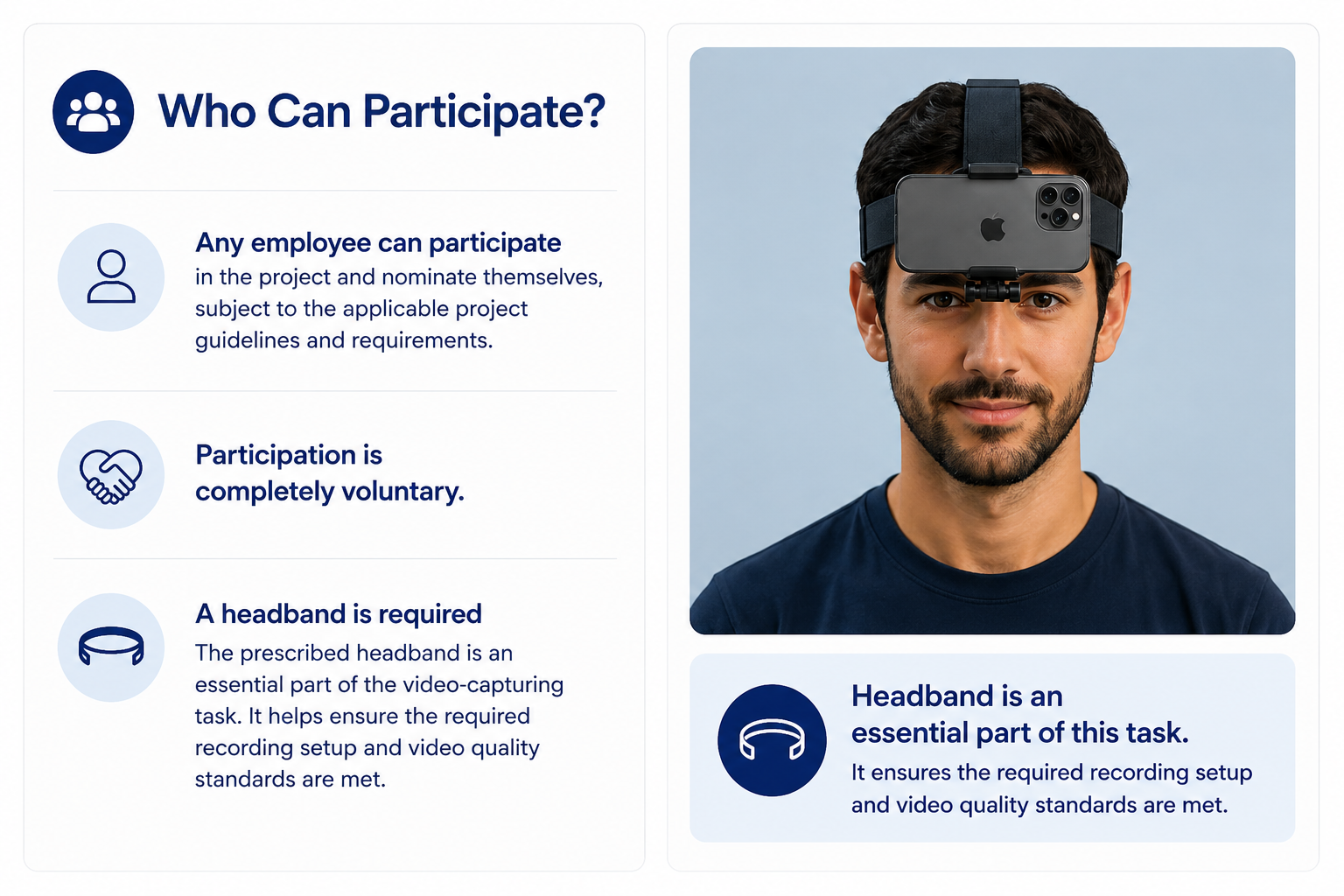
Headband Procurement
You can choose either of the following options during registration:
Option 1 – Company-provided headband
You may request a headband through the company, subject to availability and the registration process.
Option 2 – Self-procurement
You may purchase the prescribed headband yourself using the purchase details shared in the presentation/registration process.
If you choose self-procurement:
- Purchase the prescribed headband from Amazon as per the given specifications.
- Retain the original Amazon invoice/bill.
- Upload the bill through the designated process.
- Ensure the bill clearly shows the product, date, amount, and order details.
- Provide any additional information required for verification.
The eligible amount will be reimbursed only after the bill, and purchase details are verified and approved and will be subject to the applicable Terms & Conditions and reimbursement policy. Unclear, incomplete, duplicate, or unrelated bills may not be eligible for reimbursement.
Video Guidelines
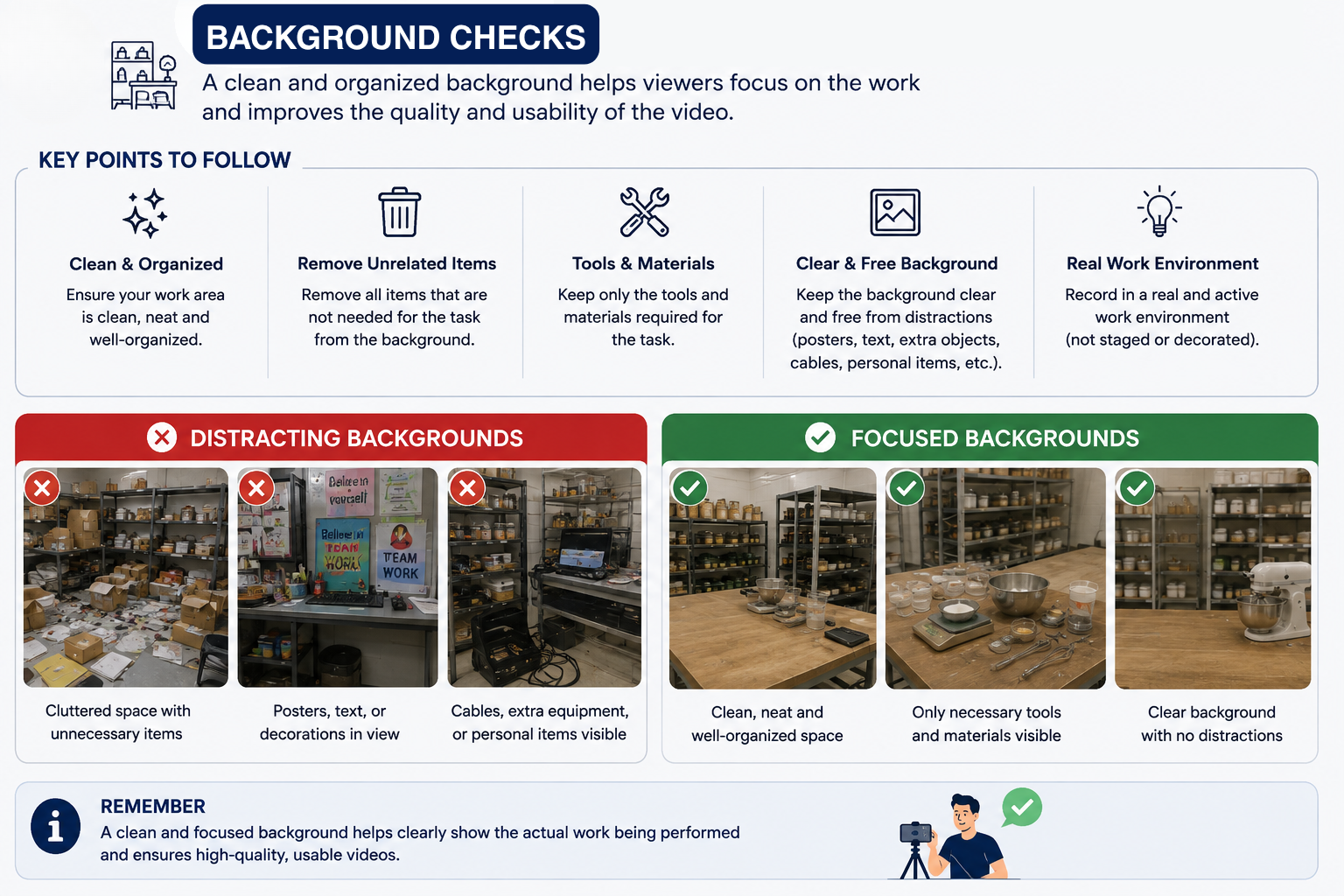
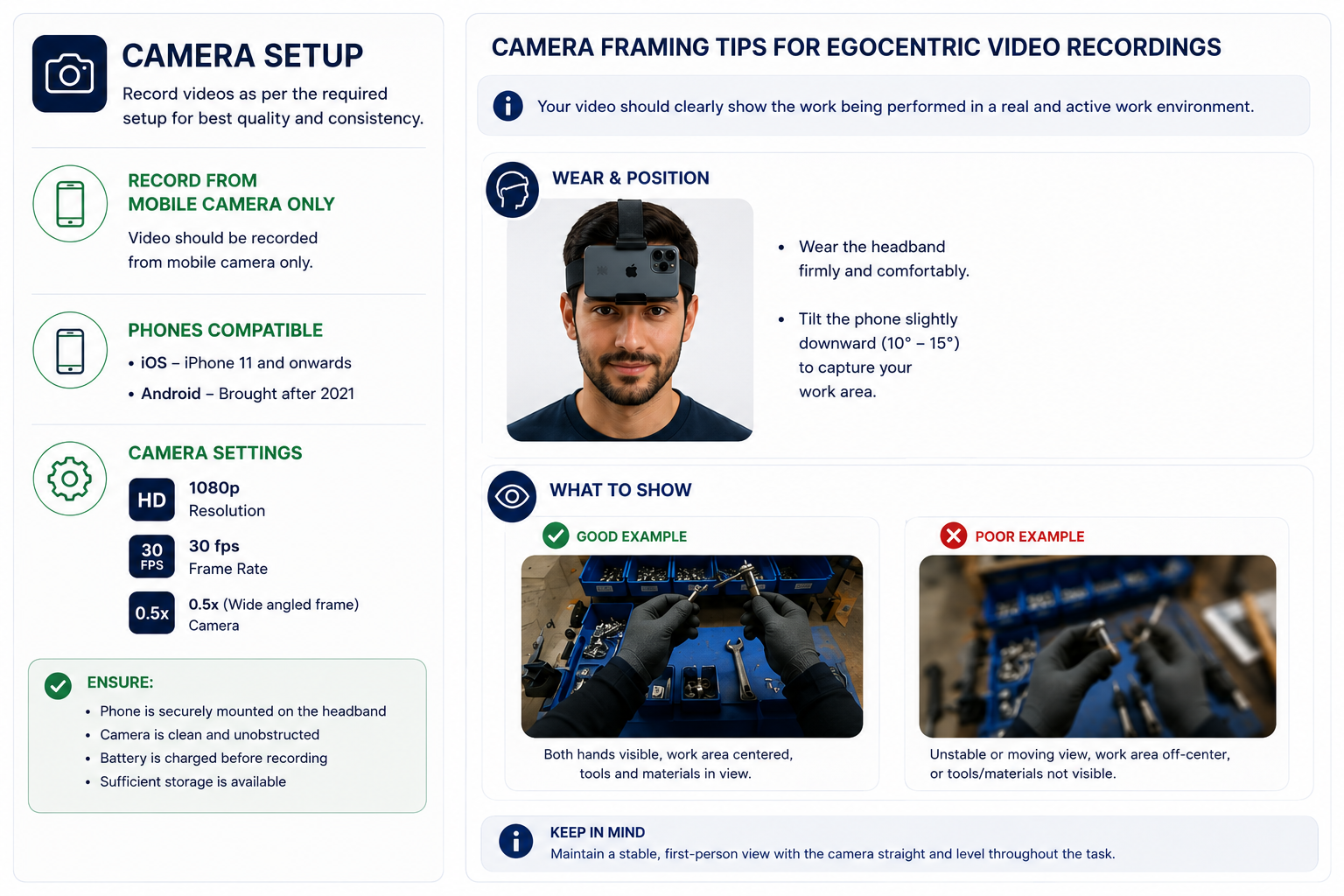
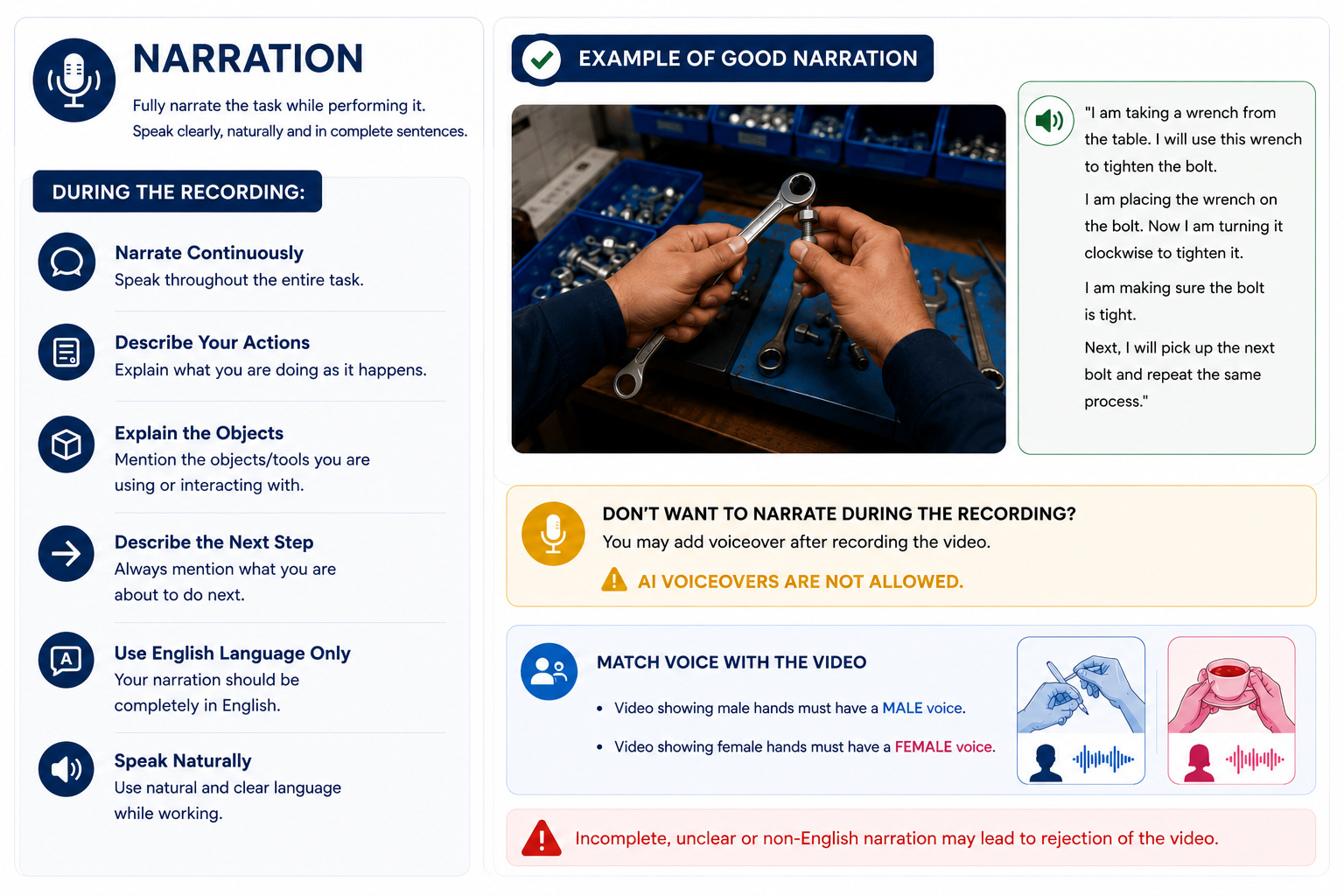
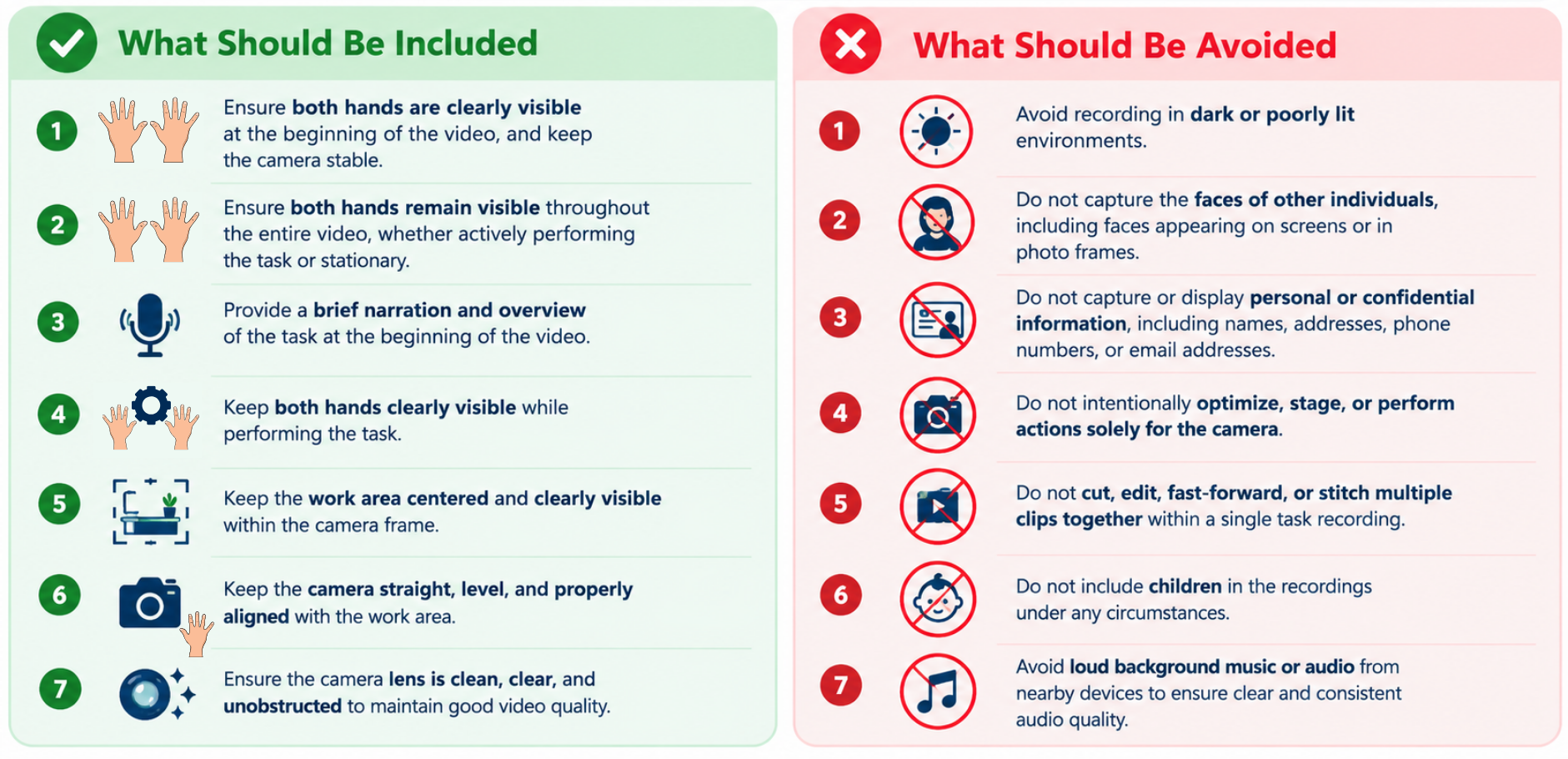
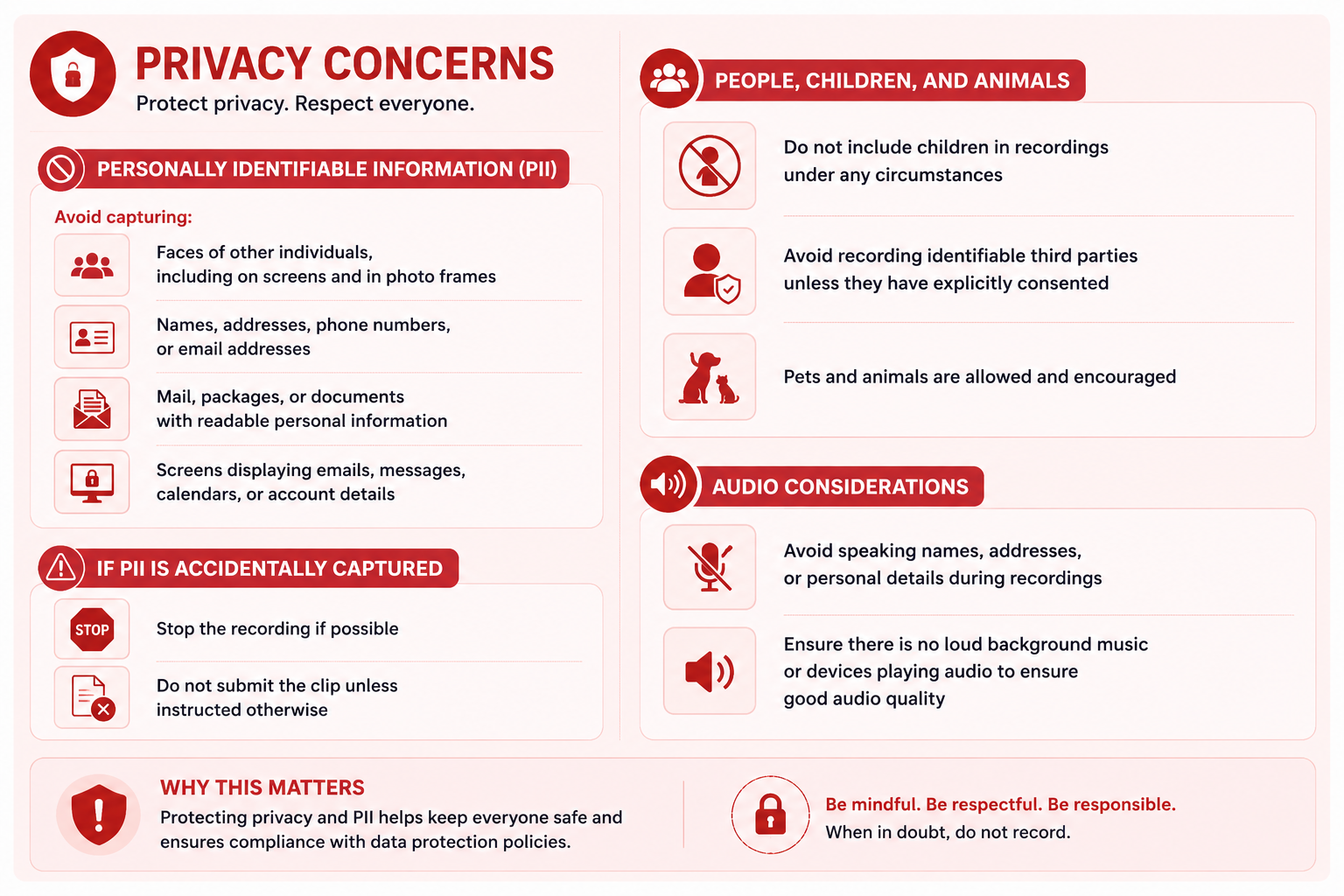
Approved Examples
Learn From Approved Videos
Watch these examples to understand the expected recording style, framing, narration, and overall quality.
These videos meet the project quality standards and are good examples of the expected recording style.
Opening & Assembling a Mop and Bucket System
- Task is clearly visible
- Appropriate first-person perspective
- Focus remains on the activity
- Good video and audio quality
- Meets expected recording style
Playing Typing Attack
- Clear activity and steps
- Appropriate framing and perspective
- Hands and task are visible
- Good overall recording quality
- Follows project guidelines
Rejected Examples
Avoid These Common Mistakes
These examples demonstrate common issues that can result in a video being rejected.
Learn from these examples and avoid these common mistakes to ensure your videos are accepted.
Tire Repair (Vloggy)
The recording feels more like a personal vlog than a task-focused demonstration.
Organizing a Wardrobe (Poor Quality)
Poor sound and video quality, with limited visibility of the hands.
Clipping Nails (Improper Ending)
Ends with unnecessary conversational/vlog-style commentary.
Coloring an Image (Insufficient Narration)
Doesn’t have enough narration to explain what is happening.
Video Submission
How to Submit Your Video
Before uploading your video, please ensure that the file is named according to the prescribed format below:
File Naming Format:
<participant_id>_<task>_<location>_<egocentric-mobile>_<date>.mp4
Example:
P012_load-dishwasher_kitchen_egocentric-mobile_20260203.mp4
File Naming Guidelines
- Participant ID: Use the ID provided by Innodata (e.g., P012). Do not use your name.
- Task: Use a short, descriptive task name, such as load-dishwasher, fold-laundry, or put-away-groceries.
- Location: Mention the recording location, such as kitchen, laundry-room, living-room, or home-office.
- Camera: Use egocentric-mobile.
- Date: Use the YYYYMMDD format (e.g., 20260203).
- File Format: Save and upload the video in .mp4
Important: Please follow the naming convention exactly to ensure your submission can be identified and processed correctly.
Rewards
Employees can earn ₹1,000 for every completed and approved one hour of video content submitted in accordance with the applicable guidelines.
You do not need to record a continuous one-hour video. Multiple videos can be submitted, provided that each individual video is between 2 and 20 minutes, and the total approved duration meets the one-hour requirement.
Example
10 minutes + 15 minutes + 20 minutes + 15 minutes = 60 minutes (1 hour) = ₹1,000
Payment Eligibility
Payment will be applicable only to video content that:
- Follows all prescribed recording and technical guidelines.
- Is submitted through the designated official submission process.
- Meets the required quality standards.
- Successfully completes the review and quality check process.
- Is accepted and approved by the designated approving authority.
- Is original, complete, and non-duplicate content.
Please Note: Registration or submission of video content does not guarantee payment. Rejected, incomplete, duplicate, or non-compliant content will not qualify for payment unless specifically approved by the designated authority.
Communication Channel
Have a question or need clarification about the initiative? Join the communication group using the link below. You can raise your queries, get timely assistance, and stay updated on important announcements, guidelines, and submission-related information.